
R21xx-HP FlexFabric 11900 Layer 2 LAN Switching Configuration Guide



148
• Detects configuration errors on peer devices.
• Remotely configures the peer device if the peer device accepts the configuration.
NOTE:
HP devices support only the remote configuration function.
Figure 45 DCBX application scenario
DCBX enables lossless packet transmission on DCE networks.
As shown in Figure 45, DC
BX applies to an FCoE based data center network, and operates on an access
switch. DCBX enables the switch to control the server adapter, and simplifies the configuration and
guarantees configuration consistency. DCBX extends LLDP by using the IEEE 802.1 organizationally
specific TLVs (DCBX TLVs) to transmit DCBX data, including Application Protocol (APP), Enhanced
Transmission Selection (ETS), and PFC.
HP devices can send the three types of DCBX information to a server adapter supporting FCoE, but they
cannot receive these types of DCBX information.
DCBX configuration task list
Tasks at a
g
lance
(Required.) Enabling LLDP and DCBX TLV advertising
(Required.) Configuring APP parameters
(Optional.) Configuring ETS parameters:
• Configuring the 802.1p-to-local priority mapping
• Configuring group-based WRR queuing
(Required.) Configuring PFC parameters
Enabling LLDP and DCBX TLV advertising
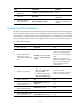
To enable the device to advertise APP, ETS, and PFC data through an interface, enable LLDP globally and
enable LLDP and DCBX TLV advertising on the interface.
To enable LLDP and DCBX TLV advertising:
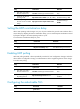
Ste
p
Command
Remarks
1. Enter system view.
system-view N/A
2. Enable LLDP globally.
lldp global enable
By default, LLDP is disabled
globally.