
R21xx-HP FlexFabric 11900 Layer 2 LAN Switching Configuration Guide



149
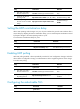
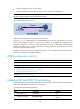
Ste
p
Command
Remarks
3. Enter Layer 2 Ethernet
interface view.
interface interface-type interface-number N/A
4. Enable LLDP.
lldp enable
By default, LLDP is enabled on
an interface.
5. Enable the interface to
advertise DCBX TLVs.
lldp tlv-enable dot1-tlv dcbx
By default, DCBX TLV
advertising is disabled on an
interface.
Configuring APP parameters
The device negotiates with the server adapter by using the APP parameters to control the 802.1p priority
values of the protocol packets that the server adapter sends, and to identify traffic based on the 802.1p
priority values. For example, the device can use the APP parameters to negotiate with the server adapter
to set the 802.1p priority of all FCoE packets and FIP packets to 3. If the negotiation succeeds, all the
FCoE packets and FIP packets that the server adapter sends to the device carry the 802.1p priority 3.
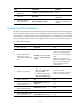
To configure APP parameters:
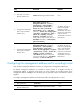
Ste
p
Command
Remarks
1. Enter system view.
system-view N/A
2. Create an Ethernet frame
header ACL or an IPv4
advanced ACL and enter ACL
view.
acl number acl-number [ name
acl-name ] [ match-order { auto |
config } ]
An Ethernet frame header ACL
number is in the range of 4000 to
4999. An IPv4 advanced ACL
number is in the range of 3000 to
3999.
DCBX Rev 1.00 supports only
Ethernet frame header ACLs. DCBX
Rev 1.01 supports both Ethernet
frame header ACLs and IPv4
advanced ACLs.
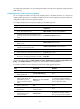
3. Create a rule for the ACL.
• For the Ethernet frame header
ACL:
rule [ rule-id ] permit type
protocol-type ffff
• For the IPv4 advanced ACL:
rule [ rule-id ] permit { tcp |
udp } destination-port eq port
Use either command.
Create rules according to the type
of the ACL previously created.
4. Return to system view.
quit N/A
5. Create a class, specify the
operator of the class as OR,
and enter class view.
traffic classifier classifier-name
operator or
N/A
6. Use the specified ACL as the
match criterion of the class.
if-match acl acl-number N/A
7. Return to system view.
quit N/A
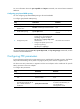
8. Create a traffic behavior and
enter traffic behavior view.
traffic behavior behavior-name N/A