
R21xx-HP FlexFabric 11900 Layer 2 LAN Switching Configuration Guide



150
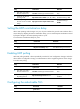
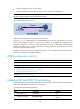
Ste
p
Command
Remarks
9. Configure the behavior to
mark packets with the specific
802.1p priority.
remark dot1p 8021p N/A
10. Return to system view.
quit N/A
11. Create a QoS policy and
enter QoS policy view.
qos policy policy-name N/A
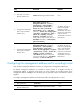
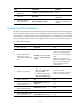
12. Associate the class with the
traffic behavior in the QoS
policy, and apply the
association to DCBX.
classifier classifier-name behavior
behavior-name mode dcbx
In a QoS policy, you can configure
multiple class-behavior
associations. A packet might be
configured with multiple 802.1p
priority marking or mapping
actions, and the one configured
first takes effect.
13. Return to system view.
quit N/A
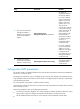
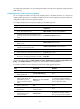
14. Apply the QoS policy.
• (Method 1) To the outgoing
traffic of all ports:
qos apply policy policy-name
global outbound
• (Method 2) To the outgoing
traffic of a Layer 2 Ethernet
interface:
a. Enter Layer 2 Ethernet
interface view:
interface interface-type
interface-number
b. Apply the QoS policy to
the outgoing traffic:
qos apply policy
policy-name outbound
Use either method.
• Configurations made in system
view take effect on all ports.
• Configurations made in Layer 2
Ethernet interface view take
effect on the interface.
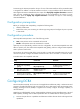
For more information about the acl, rule, traffic classifier, if-match, traffic behavior, remark dot1p, qos
policy, classifier behavior, qos apply policy global, and qos apply policy commands, see ACL and QoS
Command Reference.
NOTE:
A
n Ethernet frame header ACL identifies application protocol packets by protocol number. An IPv4
advanced ACL identifies application protocol packets by IP port number. DCBX Rev 1.00 identifies
application protocol packets only by protocol number and advertises TLVs with protocol number 0x8906
(FCoE) only. DCBX Rev 1.01 supports identifyin
g
application protocol packets by both protocol number
and IP port number, does not restrict the protocol number or IP port number for advertising TLVs, and can
advertise up to 77 TLVs according to the remaining length of the current packet.
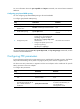
Configuring ETS parameters
ETS provides committed bandwidth. The device uses ETS parameters to negotiate with the server adapter,
controls the server adapter's transmission speed of the specific type of traffic, and guarantees that the
transmission speed is within the committed bandwidth of the interface. In this way, no traffic loss occurs
due to congestion.