
R21xx-HP FlexFabric 11900 Layer 2 LAN Switching Configuration Guide



151
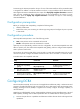
To configure ETS parameters, you must configure the 802.1p-to-local priority mapping and group-based
WRR queuing.
Configuring the 802.1p-to-local priority mapping
You can configure the 802.1p-to-local priority mapping either in the MQC approach or in the priority
mapping table approach. If you configure the 802.1p-to-local priority mapping in both approaches, the
configuration made in the former approach applies.
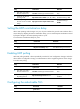
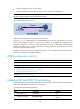
To configure the 802.1p-to-local priority mapping in the MQC approach:
Ste
p
Command
1. Enter system view.
system-view
2. Create a class, specify the operator of the class
as OR, and enter class view.
traffic classifier classifier-name operator or
3. Configure the class to match packets with the
specific service provider network 802.1p priority
values.
if-match service-dot1p 8021p-list
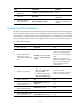
4. Return to system view.
quit
5. Create a traffic behavior and enter traffic
behavior view.
traffic behavior behavior-name
6. Configure the behavior to mark packets with the
specified local precedence value.
remark local-precedence local-precedence
7. Return to system view.
quit
8. Create a QoS policy and enter QoS policy view.
qos policy policy-name
9. Associate the class with the traffic behavior in the
QoS policy, and apply the association to DCBX.
classifier classifier-name behavior behavior-name
mode dcbx
For more information about the traffic classifier, if-match, traffic behavior, remark local-precedence, qos
policy, and classifier behavior commands, see ACL and QoS Command Reference.
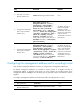
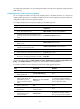
To configure the 802.1p priority mapping in the priority mapping table approach:
Ste
p
Command
Remarks
1. Enter system view.
system-view N/A
2. Enter 802.1p-to-local priority
mapping table view.
qos map-table dot1p-lp N/A
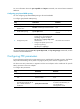
3. Configure the priority
mapping table to map the
specific 802.1p priority
values to a local precedence
value.
import import-value-list export
export-value
For information about the default
priority mapping tables, see ACL and
QoS Configuration Guide.
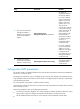
4. Return to system view.
quit N/A
5. Enter Layer 2 Ethernet
interface view.
interface interface-type
interface-number
N/A
6. Configure the interface to
trust the 802.1p priority
carried in packets.
undo qos trust
By default, an interface trusts the
802.1p priority carried in packets.