
R21xx-HP FlexFabric 11900 Layer 2 LAN Switching Configuration Guide


8
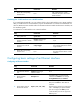
Step Command Remarks
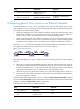
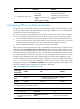
3. Enable generic flow control.
• Enable TxRx mode generic
flow control:
flow-control
• Enable Rx mode generic flow
control:
flow-control receive enable
Use one of the commands.
By default, Rx mode generic flow
control is disabled on an Ethernet
interface.
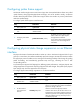
Configuring PFC on an Ethernet interface
PFC performs flow control based on 802.1p priorities. With PFC enabled, an interface requires its peer
to suspend sending packets with certain 802.1p priorities when congestion occurs. By decreasing the
transmission rate, PFC helps avoid packet loss.
You can enable PFC for certain 802.1p priorities at the two ends of a link. When network congestion
occurs, the local device checks the PFC status for the 802.1p priority carried in each arriving packet.
• If PFC is enabled for the 802.1p priority, the local device accepts the packet and sends a PFC pause
frame to the peer. The peer stops sending packets carrying this 802.1p priority for an interval as
specified in the PFC pause frame. This process repeats until the congestion is removed.
• If PFC is disabled for the 802.1p priority, the local port drops the packet.
Suppose both the local end and the peer end are enabled with priority-based flow control (PFC) and
configured with the priority-flow-control no-drop dot1p dot1p-list command. When congestion occurs,
the local end first maps the 802.1p priority of the received packets to a local precedence value according
to the 802.1p-local priority mapping table, which is configurable. If the local precedence value is within
the range specified by the dot1p-list argument, the port preferentially sends the packet. For more
information about the 802.1p-local priority mapping table, see ACL and QoS Configuration Guide.
The state of the PFC function is determined by the PFC configuration on the local end and on the peer end.
In Table 1, the f
i
rst line lists the PFC configuration on the local port, the first column lists the PFC
configuration on the peer, and enabled and disabled are two possible negotiation results. Make sure all
ports that a data flow passes through have the same PFC configuration.
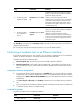
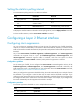
Table 1 PFC configurations and negotiation results
Local (right)
Peer (below)
enable auto Default
enable
Enabled Enabled. Disabled
auto
Enabled
• Enabled if negotiation succeeds.
• Disabled if negotiation fails.
Disabled
Default
Disabled Disabled. Disabled
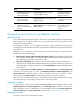
To configure PFC on an Ethernet interface:
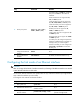
Step Command Remarks
1. Enter system view. system-view N/A
2. Enable PFC on the interface
through automatic negotiation
or forcibly.
priority-flow-control { auto |
enable }
By default, PFC is disabled.