
R21xx-HP FlexFabric 11900 Layer 2 LAN Switching Configuration Guide



152
For more information about the qos map-table and import commands, see ACL and QoS Command
Reference.
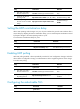
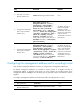
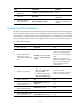
Configuring group-based WRR queuing
You can configure group-based WRR queuing to allocate bandwidth.
To configure group-based WRR queuing:
Ste
p
Command
Remarks
1. Enter system view.
system-view N/A
2. Enter Layer 2 Ethernet
interface view.
interface interface-type interface-number N/A
3. Enable WRR queuing.
qos wrr byte-count
By default, WRR queuing is
disabled.
4. Configure the queue.
• Add the specific queue to WRR
priority group 1 and configure the
scheduling weight for the queue:
qos wrr queue-id group 1 byte-count
schedule-value
• Configure the specific queue to use
strict priority queuing:
qos wrr queue-id group sp
Use at least one command.
For more information about the qos wrr, qos wrr byte-count, and qos wrr group sp commands, see ACL
and QoS Command Reference.
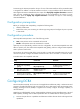
Configuring PFC parameters
To avoid dropping packets with a certain 802.1p priority, enable PFC for the 802.1p priority. This feature
helps reduce the sending rate of packets carrying this priority when network congestion occurs.
The device uses PFC parameters to negotiate with the server adapter and to enable PFC for specific
802.1p priorities on the server adapter.
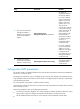
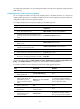
To configure PFC parameters:
Ste
p
Command
Remarks
1. Enter system view.
system-view N/A
2. Enter Layer 2 Ethernet interface
view.
interface interface-type
interface-number
N/A
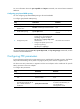
3. Enable the Ethernet interface to
automatically negotiate with its
peer to decide whether to
enable PFC.
priority-flow-control auto
By default, PFC is disabled.
To advertise the PFC data, you
must enable PFC in
autonegotiation mode.