
R21xx-HP FlexFabric 11900 Layer 2 LAN Switching Configuration Guide



153
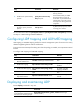
Ste
p
Command
Remarks
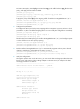
4. Enable PFC for specific 802.1p
priorities.
priority-flow-control no-drop
dot1p dot1p-list
By default, PFC is disabled for all
802.1p priorities.
HP recommends that you enable
PFC for the 802.1p priority of
FCoE traffic. If you enable PFC for
multiple 802.1p priorities, packet
loss might occur during periods of
congestion.
5. Configure the interface to trust
the 802.1p priority carried in
packets.
undo qos trust
By default, the port priority of the
incoming port is trusted.
For more information about the priority-flow-control and priority-flow-control no-drop dot1p commands,
see Layer 2—LAN Switching Command Reference.
Configuring LLDP trapping and LLDP-MED trapping
LLDP trapping or LLDP-MED trapping notifies the network management system of events such as newly
detected neighboring devices and link malfunctions.
To prevent excessive LLDP traps from being sent when the topology is unstable, set a trap transmit interval
for LLDP.
To configure LLDP trapping and LLDP-MED trapping:
Step Command Remarks
1. Enter system view.
system-view N/A
2. Enter Layer 2 or Layer 3
Ethernet interface view.
interface interface-type interface-number N/A
3. Enable LLDP trapping.
lldp notification remote-change enable
By default, LLDP trapping is
disabled.
4. Enable LLDP-MED trapping.
lldp notification med-topology-change
enable
By default, LLDP-MED
trapping is disabled.
5. Return to system view.
quit N/A
6. (Optional.) Set the LLDP
trap transmit interval.
lldp timer notification-interval interval
The default setting is 5
seconds.
Displaying and maintaining LLDP
Execute display commands in any view.
Task Command
Display the global LLDP information
or the information contained in the
LLDP TLVs to be sent through a port.
display lldp local-information [ global | interface interface-type
interface-number ]