
R21xx-HP FlexFabric 11900 Layer 2 LAN Switching Configuration Guide



154
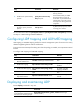
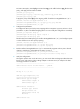
Task Command
Display the information contained
in the LLDP TLVs sent from
neighboring devices.
display lldp neighbor-information [ interface interface-type
interface-number [ verbose ] | list [ system-name system-name ] |
verbose ]
Display LLDP statistics. display lldp statistics [ global | interface interface-type interface-number ]
Display LLDP status of a port. display lldp status [ interface interface-type interface-number ]
Display types of advertisable
optional LLDP TLVs.
display lldp tlv-config [ interface interface-type interface-number ]
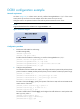
Basic LLDP configuration example
Network requirements
As shown in Figure 46, the NMS and Switch A are located in the same Ethernet network. An MED device
and Switch B are connected to Ten-GigabitEthernet 1/0/1 and Ten-GigabitEthernet 1/0/2 of Switch A.
Enable LLDP globally on Switch A and Switch B to monitor the link between Switch A and Switch B and
the link between Switch A and the MED device on the NMS.
Figure 46 Network diagram
Configuration procedure
1. Configure Switch A:
# Enable LLDP globally.
<SwitchA> system-view
[SwitchA] lldp global enable
# Enable LLDP on Ten-GigabitEthernet 1/0/1 and Ten-GigabitEthernet 1/0/2. (You can skip this
step because LLDP is enabled on ports by default.) Set the LLDP operating mode to Rx.
[SwitchA] interface ten-gigabitethernet 1/0/1
[SwitchA-Ten-GigabitEthernet1/0/1] lldp enable
[SwitchA-Ten-GigabitEthernet1/0/1] lldp admin-status rx
[SwitchA-Ten-GigabitEthernet1/0/1] quit
[SwitchA] interface ten-gigabitethernet 1/0/2
[SwitchA-Ten-GigabitEthernet1/0/2] lldp enable
[SwitchA-Ten-GigabitEthernet1/0/2] lldp admin-status rx
[SwitchA-Ten-GigabitEthernet1/0/2] quit