
R21xx-HP FlexFabric 11900 Layer 2 LAN Switching Configuration Guide


156
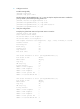
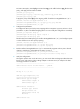
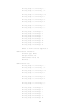
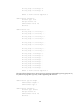
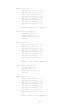
The sample output shows that:
{ Ten-GigabitEthernet 1/0/1 of Switch A connects to an MED device.
{ Ten-GigabitEthernet 1/0/2 of Switch A connects to a non-MED device.
{ Both ports operate in Rx mode, and they can receive LLDPDUs but cannot send LLDPDUs.
# Remove the link between Switch A and Switch B, and then display the global LLDP status and
port LLDP status on Switch A.
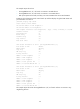
[SwitchA] display lldp status
Global status of LLDP: Enable
The current number of LLDP neighbors: 1
The current number of CDP neighbors: 0
LLDP neighbor information last changed time: 0 days, 0 hours, 5 minutes, 20 seconds
Transmit interval : 30s
Hold multiplier : 4
Reinit delay : 2s
Transmit delay : 2s
Trap interval : 5s
Fast start times : 3
LLDP status information of Port 1 [Ten-GigabitEthernet1/0/1]:
Port status of LLDP : Enable
Admin status : RX_Only
Trap flag : No
MED trap flag : No
Polling interval : 0s
Number of LLDP neighbors : 1
Number of MED neighbors : 1
Number of CDP neighbors : 0
Number of sent optional TLV : 0
Number of received unknown TLV : 5
LLDP status information of Port 2 [Ten-GigabitEthernet1/0/2]:
Port status of LLDP : Enable
Admin status : RX_Only
Trap flag : No
MED trap flag : No
Polling interval : 0s
Number of LLDP neighbors : 0
Number of MED neighbors : 0
Number of CDP neighbors : 0
Number of sent optional TLV : 0
Number of received unknown TLV : 0
The sample output shows that Ten-GigabitEthernet 1/0/2 of Switch A does not connect to any
neighboring devices.