
R21xx-HP FlexFabric 11900 Layer 2 LAN Switching Configuration Guide


157
DCBX configuration example
Network requirements
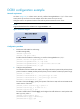
As shown in Figure 47, in a data center network, interface Ten-GigabitEthernet 1/0/1 of the access
switch (Switch A) connects to the FCoE adapter of the data center server (DC server).
Configure Switch A to implement lossless FCoE and FIP packet transmission to DC server.
NOTE:
Suppose that both Switch A and DC server support DCBX Rev 1.01.
Figure 47 Network diagram
Configuration procedure
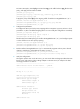
1. Enable LLDP and DCBX TLV advertising:
# Enable LLDP globally.
<SwitchA> system-view
[SwitchA] lldp global enable
# Enable LLDP and DCBX TLV advertising on interface Ten-GigabitEthernet 1/0/1.
[SwitchA] interface ten-gigabitethernet 1/0/1
[SwitchA-Ten-GigabitEthernet1/0/1] lldp enable
[SwitchA-Ten-GigabitEthernet1/0/1] lldp tlv-enable dot1-tlv dcbx
[SwitchA-Ten-GigabitEthernet1/0/1] quit
2. Configure APP parameters:
# Create Ethernet frame header ACL 4000, and configure the ACL to permit FCoE packets (whose
protocol number is 0x8906) and FIP packets (whose protocol number is 0x8914) to pass through.
[SwitchA] acl number 4000
[SwitchA-acl-ethernetframe-4000] rule permit type 8906 ffff
[SwitchA-acl-ethernetframe-4000] rule permit type 8914 ffff
[SwitchA-acl-ethernetframe-4000] quit
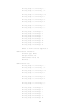
# Create a class named app_c, specify the operator of the class as OR, and use ACL 4000 as the
match criterion of the class.
[SwitchA] traffic classifier app_c operator or
[SwitchA-classifier-app_c] if-match acl 4000
[SwitchA-classifier-app_c] quit
# Create a traffic behavior named app_b, and configure the traffic behavior to mark packets with
802.1p priority value 3.
[SwitchA] traffic behavior app_b
[SwitchA-behavior-app_b] remark dot1p 3
[SwitchA-behavior-app_b] quit