
R21xx-HP FlexFabric 11900 Layer 2 LAN Switching Configuration Guide

16
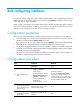
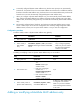
To configure a null interface:
Ste
p
Command
Remarks
1. Enter system view.
system-view N/A
2. Enter null interface view.
interface null 0
Interface Null 0 is the default null
interface on the device and cannot
be manually created or removed.
Only one null interface, Null 0, is
supported on the device. The null
interface number is fixed at 0.
3. Set the interface description.
description text The default setting is NULL0 Interface.
4. Restore the default settings for
the null interface.
default N/A
Displaying and maintaining loopback and null
interfaces
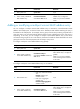
Execute display commands in any view and reset commands in user view.
Task Command
Display information about the specified or all
loopback interfaces.
display interface [ loopback [ interface-number ] ] [ brief
[ description ] ]
Display information about the null interface. display interface [ null [ 0 ] ] [ brief [ description ] ]
Clear the statistics on the specified or all loopback
interfaces.
reset counters interface loopback [ interface-number ]
Clear the statistics on the null interface. reset counters interface [ null [ 0 ] ]