
R21xx-HP FlexFabric 11900 Layer 2 LAN Switching Configuration Guide


22
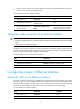
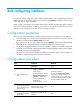
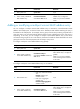
Step Command Remarks
1. Enter system view.
system-view N/A
2. Add or modify a blackhole
MAC address entry.
mac-address blackhole
mac-address vlan vlan-id
By default, no blackhole MAC
address entry is configured.
Make sure you have created the
VLAN.
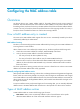
Adding or modifying a multiport unicast MAC address entry
You can configure a multiport unicast MAC address entry to associate a unicast destination MAC
address with multiple ports, so that the frame with a destination MAC address matching the entry is
forwarded out of multiple ports. For example, when a group of servers are processing a request from a
client, the client is not concerned with the details of these servers and believes that only one server is
responding. In this case, you can configure a multiport unicast MAC address entry on the device
connected to the group of servers. In this manner, the device forwards the frame destined for the server
group (the one server from the perspective of the client) to every server.
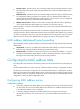
To configure a multiport unicast MAC address entry globally:
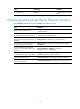
Step Command Remarks
1. Enter system view. system-view N/A
2. Add or modify a multiport
unicast MAC address entry.
mac-address multiport
mac-address interface interface-list
vlan vlan-id
By default, no multiport unicast
MAC address entry is configured
globally.
Make sure you have created the
VLAN and assigned the interface
to the VLAN.
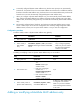
To configure a multiport unicast MAC address entry on an interface:
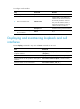
Step Command Remarks
1. Enter system view.
system-view N/A
2. Enter interface view.
• Enter Layer 2 Ethernet interface
view:
interface interface-type
interface-number
• Enter Layer 2 aggregate
interface view:
interface bridge-aggregation
interface-number
N/A
3. Add or modify a multiport
unicast MAC address entry.
mac-address multiport
mac-address vlan vlan-id
By default, no multiport unicast
MAC address entry is configured
on an interface.
Make sure you have created the
VLAN and assigned the interface
to the VLAN.