
R21xx-HP FlexFabric 11900 Layer 2 LAN Switching Configuration Guide


24
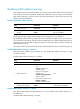
Step Command Remarks
1. Enter system view.
system-view N/A
2. Enable global MAC address
learning.
mac-address mac-learning enable
By default, global MAC address
learning is enabled.
3. Enter VLAN view.
vlan vlan-id N/A
4. Disable MAC address
learning on the VLAN.
undo mac-address mac-learning
enable
By default, MAC address learning
on the VLAN is enabled.
Configuring the aging timer for dynamic MAC address entries
The MAC address table uses an aging timer for dynamic MAC address entries for security and efficient
use of table space. If a dynamic MAC address entry has failed to update before the aging timer expires,
the device deletes the entry. This aging mechanism makes sure the MAC address table could promptly
update to accommodate latest network changes.
Set the aging timer appropriately. A stable network requires a longer aging interval and an unstable
network requires a shorter aging interval. A too long aging interval may cause the MAC address table
to retain outdated entries, exhaust the MAC address table resources, and fail to update its entries to
accommodate the latest network changes. A too short interval may result in removal of valid entries,
causing unnecessary broadcasts, which may increase network burden.
You can reduce broadcasts on a stable network by setting a long aging timer or disabling the aging
timer to prevent dynamic entries from unnecessarily aging out. By reducing broadcasts, you improve not
only network performance, but also security, because the chances for a data frame to reach unintended
destinations are reduced.
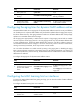
To configure the aging timer for dynamic MAC address entries:
Step Command Remarks
1. Enter system view. system-view N/A
2. Configure the aging timer for
dynamic MAC address
entries.
mac-address timer { aging seconds
| no-aging }
By default, the aging timer is 300
seconds.
The no-aging keyword disables the
aging timer.
Configuring the MAC learning limit on interfaces
To prevent the MAC address table from getting too large, you can limit the number of MAC addresses
that a port can obtain.
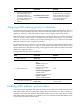
To configure the MAC learning limit on an interface:
Step Command Remarks
1. Enter system view.
system-view N/A
2. Enter Layer 2 Ethernet
interface view.
interface interface-type
interface-number
N/A