
R21xx-HP FlexFabric 11900 Layer 2 LAN Switching Configuration Guide


26
To enable MAC address synchronization:
Ste
p
Command
Remarks
1. Enter system view. system-view N/A
2. Enable MAC address
synchronization.
mac-address mac-roaming enable
By default, MAC address
synchronization is disabled.
Displaying and maintaining the MAC address table
Execute display commands in any view.
Task Command
Display MAC address table
information.
display mac-address [ mac-address [ vlan vlan-id ] | [ [ dynamic |
static ] [ interface interface-type interface-number ] | blackhole |
multiport ] [ vlan vlan-id ] [ count ] ]
Display the aging timer for dynamic
MAC address entries.
display mac-address aging-time
Display the system or interface MAC
address learning state.
display mac-address mac-learning [ interface interface-type
interface-number ]
Display MAC address statistics. display mac-address statistics
MAC address table configuration example
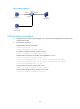
Network requirements
Host A (000f-e235-dc71) is connected to interface Ten-GigabitEthernet 1/0/1 of Device and belongs to
VLAN 1. To prevent MAC address spoofing, add a static entry for Host A in the MAC address table of
Device.
Host B (000f-e235-abcd), which once behaved suspiciously on the network, also belongs to VLAN 1. For
security, add a blackhole MAC address entry for Host B, so that all frames destined for the host will be
dropped.
Set the aging timer for dynamic MAC address entries to 500 seconds.
Configuration procedure
# Add a static MAC address entry.
<Device> system-view
[Device] mac-address static 000f-e235-dc71 interface ten-gigabitethernet 1/0/1 vlan 1
# Add a blackhole MAC address entry.
[Device] mac-address blackhole 000f-e235-abcd vlan 1
# Set the aging timer for dynamic MAC address entries to 500 seconds.
[Device] mac-address timer aging 500