
R21xx-HP FlexFabric 11900 Layer 2 LAN Switching Configuration Guide


28
Configuring MAC Information
The MAC Information feature can generate syslog messages or SNMP notifications when MAC address
entries are learned or deleted. You can use these messages to monitor users leaving or joining the
network and analyze network traffic.
The MAC Information feature buffers the MAC change syslog messages or SNMP notifications in a
queue. When the timer set for sending syslog messages or SNMP notifications does not expire, the
device overwrites the last piece of information written into the queue with the new MAC address change
if the queue has been exhausted. To send a syslog message or SNMP notification immediately after it is
created, set the queue length to zero.
Configuration guidelines
Enable MAC Information globally before you enable it on interfaces.
This feature is not applicable to EA and EB cards that are operating in MAC extension mode (bridging)
or mixed extension mode (mix-bridging-routing). For more information about the operating mode of
cards, see Fundamentals Configuration Guide.
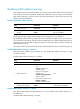
Enabling MAC Information globally
Ste
p
Command
Remarks
1. Enter system view.
system-view
N/A
2. Enable MAC Information
globally.
mac-address information enable
By default, MAC Information is
disabled globally.
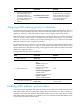
Enabling MAC Information on an interface
Ste
p
Command
Remarks
1. Enter system view.
system-view N/A
2. Enter interface view.
• Enter Layer 2 Ethernet interface
view:
interface interface-type
interface-number
• Enter S-channel interface view:
interface s-channel
interface-number.channel-id
N/A
3. Enable MAC Information on
the interface.
mac-address information enable
{ added | deleted }
By default, MAC Information is
disabled on an interface.