
R21xx-HP FlexFabric 11900 Layer 2 LAN Switching Configuration Guide


29
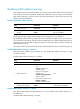
Configuring the MAC Information mode
The following MAC Information modes are available for sending MAC address changes:
• Syslog—The device sends syslog messages to notify MAC address changes. In this mode, the
device sends syslog messages to the information center, which then outputs them to the monitoring
terminal. For more information about information center, see Network Management and
Monitoring Configuration Guide.
• Trap—The device sends SNMP notifications to notify MAC address changes. In this mode, the
device sends SNMP notifications to the NMS. For more information about NMS, see Network
Management and Monitoring Configuration Guide.
To configure the MAC Information mode:
t
Ste
p
Command
Remarks
1. Enter system view.
system-view N/A
2. Configure the MAC
Information mode.
mac-address information mode
{ syslog | trap }
Optional.
The default setting is trap.
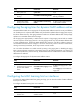
Configuring the MAC change sending interval
To prevent syslog messages or SNMP notifications from being sent too frequently, you can set the MAC
change sending interval.
To set the MAC change sending interval:
Ste
p
Command
Remarks
1. Enter system view.
system-view N/A
2. Set the MAC change sending
interval.
mac-address information interval
interval-time
The default setting is 1 second.
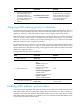
Configuring the MAC Information queue length
Ste
p
Command
Remarks
1. Enter system view. system-view N/A
2. Configure the MAC
Information queue length.
mac-address information
queue-length value
The default setting is 50.
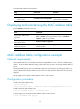
MAC Information configuration example
Network requirements
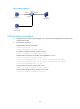
Enable MAC Information on interface Ten-GigabitEthernet 1/0/1 on Device in Figure 2 to send MAC
address changes in syslog messages to Host B.