
R21xx-HP FlexFabric 11900 Layer 2 LAN Switching Configuration Guide


30
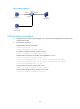
Figure 2 Network diagram
Configuration procedure
1. Configure Device to send syslog messages to Host B (see Network Management and Monitoring
Configuration Guide).
2. Enable MAC Information:
# Enable MAC Information globally.
<Device> system-view
[Device] mac-address information enable
# Configure the MAC Information mode as syslog.
[Device] mac-address information mode syslog
# Enable MAC Information on interface Ten-GigabitEthernet 1/0/1.
[Device] interface ten-gigabitethernet 1/0/1
[Device-Ten-GigabitEthernet1/0/1] mac-address information enable added
[Device-Ten-GigabitEthernet1/0/1] mac-address information enable deleted
[Device-Ten-GigabitEthernet1/0/1] quit
# Set the MAC Information queue length to 100.
[Device] mac-address information queue-length 100
# Set the MAC change sending interval to 20 seconds.
[Device] mac-address information interval 20
Server
192.168.1.3/24
Device
XGE1/0/1
XGE1/0/2
XGE1/0/3
Host A
192.168.1.1/24
Host B
192.168.1.2/24