
R21xx-HP FlexFabric 11900 Layer 2 LAN Switching Configuration Guide

40
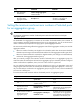
Step Command Remarks
3. Create a Layer 2 aggregate
interface and enter Layer 2
aggregate interface view.
interface bridge-aggregation
interface-number
When you create a Layer 2
aggregate interface, the system
automatically creates a Layer 2
static aggregation group
numbered the same.
4. Configure the aggregation
group to operate in dynamic
aggregation mode.
link-aggregation mode dynamic
By default, an aggregation group
operates in static aggregation
mode.
5. Exit to system view.
quit N/A
6. Assign an interface to the
specified Layer 2 aggregation
group.
a. Enter Layer 2 Ethernet
interface view:
interface interface-type
interface-number
b. Assign the interface to the
specified Layer 2
aggregation group:
port link-aggregation
group number
Repeat these two sub-steps to
assign more Layer 2 Ethernet
interfaces to the aggregation
group.
7. Configure the port priority for
the interface.
link-aggregation port-priority
port-priority
The default setting is 32768.
8. Configure the short LACP
timeout interval (3 seconds)
on the interface.
lacp period short
By default, the long LACP timeout
interval (90 seconds) is adopted by
the interface. The peer sends
LACPDUs slowly.
To avoid traffic interruption during
an ISSU, do not configure the short
LACP timeout interval before
performing an ISSU. For more
information about performing an
ISSU, see Fundamentals
Configuration Guide.
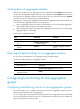
Configuring an aggregate interface
In addition to the configurations in this section, most of the configurations that can be performed on Layer
2 Ethernet interfaces can also be performed on Layer 2 aggregate interfaces.
Configuring the description of an aggregate interface
You can configure the description of an aggregate interface for administration purposes such as
describing the purpose of the interface.
To configure the description of an aggregate interface:
Step Command Remarks
1. Enter system view.
system-view
N/A