
R21xx-HP FlexFabric 11900 Layer 2 LAN Switching Configuration Guide

41
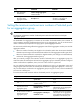
Step Command Remarks
2. Enter aggregate
interface view.
interface bridge-aggregation
interface-number
N/A
3. Configure the
description of the
aggregate interface
description text
By default, the description of an
interface is in the format of
interface-name Interface.
Setting the minimum and maximum numbers of Selected ports
for an aggregation group
IMPORTANT:
The minimum and maximum number of Selected ports must be the same for the local and peer
aggregation groups.
The bandwidth of an aggregate link increases as the number of selected member ports increases. To
avoid congestion caused by insufficient Selected ports on an aggregate link, you can set the minimum
number of Selected ports required for bringing up the specific aggregate interface.
This minimum threshold setting affects the aggregation state of both aggregation member ports and the
aggregate interface:
• When the number of member ports eligible to be selected is smaller than the minimum threshold,
all member ports change to the Unselected state and the link of the aggregate interface goes down.
• When the minimum threshold is reached, the eligible member ports change to the Selected state,
and the link of the aggregate interface goes up.
After you manually configure the maximum number of Selected ports in an aggregation group, the
maximum number of Selected ports allowed in the aggregation group is limited by both the configured
number and hardware capabilities, that is, the lower value of the two upper limits.
You can configure backup between two ports by assigning two ports to an aggregation group and
configuring the maximum number of Selected ports allowed in the aggregation group as 1. In this way,
only one Selected port is allowed in the aggregation group at any point in time, while the Unselected
port serves as a backup port.
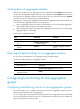
To set the minimum and maximum numbers of Selected ports for an aggregation group:
Ste
p
Command
Remarks
1. Enter system view.
system-view N/A
2. Enter aggregate interface
view.
interface bridge-aggregation
interface-number
N/A
3. Set the minimum number of
Selected ports for the
aggregation group.
link-aggregation selected-port
minimum number
By default, the minimum number of
Selected ports for the aggregation
group is not specified.
4. Set the maximum number of
Selected ports for the
aggregation group.
link-aggregation selected-port
maximum number
By default, the maximum number of
Selected ports for an aggregation
group depends on the hardware
capabilities of the member ports.