
R21xx-HP FlexFabric 11900 Layer 2 LAN Switching Configuration Guide


44
• Layer 1 MPLS label
• Destination IP address and source IP address
• Destination MAC address and source MAC address
• Layer 1 MPLS label and Layer 2 MPLS label
Enabling local-first load sharing for link aggregation
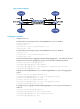
Use the local-first load sharing mechanism in a multi-switch link aggregation scenario to distribute traffic
preferentially across member ports on the ingress switch rather than all member ports.
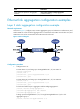
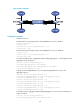
When you aggregate ports on different member switches in an IRF fabric, you can use local-first load
sharing to reduce traffic on IRF links, as shown in Figure 6. F
or more information about IRF, see IR
F
Configuration Guide.
Figure 6 Load sharing for multi-switch link aggregation in an IRF fabric
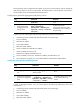
To enable local-first load sharing for link aggregation:
Ste
p
Command Remarks
1. Enter system view.
system-view N/A
2. Enable local-first load-sharing
for link aggregation.
link-aggregation load-sharing
mode local-first
Optional.
Enabled by default.
Local-first load sharing for link
aggregation takes effect on only
known unicast packets.
Enabling link-aggregation traffic redirection
Link-aggregation traffic redirection prevents traffic interruption.
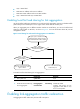
Any Selected ports on the
ingress switch?
Local-first load sharing
mechanism enabled?
Yes No
Yes
No
The egress port for a traffic flow is an
aggregate interface that has Selected
ports on different IRF member switches
Packets are load shared only
across the Selected ports on the
ingress switch
Packets are load shared across
all Selected ports