
R21xx-HP FlexFabric 11900 Layer 2 LAN Switching Configuration Guide

46
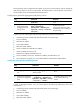
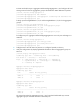
Task Command
Clear statistics for specific or all aggregate
interfaces.
reset counters interface [ bridge-aggregation
[ interface-number ] ]
Ethernet link aggregation configuration examples
Layer 2 static aggregation configuration example
Network requirements
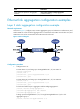
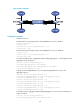
As shown in Figure 7, configure a Layer 2 static aggregation group on both Device A and Device B, and
enable VLAN 10 at one end of the aggregate link to communicate with VLAN 10 at the other end, and
VLAN 20 at one end to communicate with VLAN 20 at the other end.
Figure 7 Network diagram
Configuration procedure
1. Configure Device A:
# Create VLAN 10, and assign port
Ten-GigabitEthernet 1/0/4 to VLAN 10.
<DeviceA> system-view
[DeviceA] vlan 10
[DeviceA-vlan10] port ten-gigabitethernet 1/0/4
[DeviceA-vlan10] quit
# Create VLAN 20, and assign port Ten-GigabitEthernet 1/0/5 to VLAN 20.
[DeviceA] vlan 20
[DeviceA-vlan20] port ten-gigabitethernet 1/0/5
[DeviceA-vlan20] quit
# Create and enable Layer 2 aggregate interface Bridge-Aggregation 1.
[DeviceA] interface bridge-aggregation 1
[DeviceA-Bridge-Aggregation1] undo shutdown
[DeviceA-Bridge-Aggregation1] quit
# Assign ports Ten-GigabitEthernet 1/0/1 through Ten-GigabitEthernet 1/0/3 to link
aggregation group 1.
[DeviceA] interface ten-gigabitethernet 1/0/1