
R21xx-HP FlexFabric 11900 Layer 2 LAN Switching Configuration Guide

54
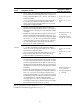
Task Command
Display isolation group information on a
multiple-isolation-group device.
display port-isolate group [ group-number ] [ | { begin |
exclude | include } regular-expression ]
Port isolation configuration example
Network requirements
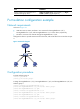
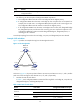
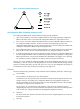
As shown in Figure 10:
• LAN users Host A, Host B, and Host C are connected to Ten-GigabitEthernet 1/0/1,
Ten-GigabitEthernet 1/0/2, and Ten-GigabitEthernet 1/0/3 on the device, respectively.
• The device connects to the Internet through Ten-GigabitEthernet 1/0/4.
Configure the device to provide Internet access for the hosts, and isolate them from one another at Layer
2.
Figure 10 Network diagram
Configuration procedure
# Create isolation group 2.
<Device> system-view
[Device] port-isolate group 2
# Assign Ten-GigabitEthernet 1/0/1, Ten-GigabitEthernet 1/0/2, and Ten-GigabitEthernet 1/0/3 to
isolation group 2.
[Device] interface ten-gigabitethernet 1/0/1
[Device-Ten-GigabitEthernet1/0/1] port-isolate enable group 2
[Device-Ten-GigabitEthernet1/0/1] quit
[Device] interface ten-gigabitethernet 1/0/2
[Device-Ten-GigabitEthernet1/0/2] port-isolate enable group 2
[Device-Ten-GigabitEthernet1/0/2] quit
[Device] interface ten-gigabitethernet 1/0/3
[Device-Ten-GigabitEthernet1/0/3] port-isolate enable group 2