
R21xx-HP FlexFabric 11900 Layer 2 LAN Switching Configuration Guide



66
Port roles
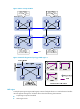
A port can play different roles in different MSTIs. As shown in Figure 16, an MST region comprises Device
A, Device B, Device C, and Device D. Port A1 and port A2 of Device A connect to the common root
bridge. Port B2 and Port B3 of Device B form a loop. Port C3 and Port C4 of Device C connect to other
MST regions. Port D3 of Device D directly connects to a host.
Figure 16 Port roles
MSTP calculation involves the following port roles:
• Root port—Forwards data for a non-root bridge to the root bridge. The root bridge does not have
any root port.
• Designated port—Forwards data to the downstream network segment or device.
• Alternate port—Serves as the backup port for a root port or master port. When the root port or
master port is blocked, the alternate port takes over.
• Backup port—Serves as the backup port of a designated port. When the designated port is invalid,
the backup port becomes the new designated port. A loop occurs when two ports of the same
spanning tree device are connected, so the device blocks one of the ports. The blocked port acts as
the backup.
• Edge port—Does not connect to any network device or network segment, but directly connects to a
user host.
• Master port—Serves as a port on the shortest path from the local MST region to the common root
bridge. The master port is not always located on the regional root. It is a root port on the IST or CIST
and still a master port on the other MSTIs.
• Boundary port—Connects an MST region to another MST region or to an STP/RSTP-running device.
In MSTP calculation, a boundary port's role on an MSTI is consistent with its role on the CIST. But
that is not true with master ports. A master port on MSTIs is a root port on the CIST.
Port states
In MSTP, a port can be in one of the following states: