
R21xx-HP FlexFabric 11900 Layer 2 LAN Switching Configuration Guide

75
Configuring the network diameter of a switched
network
Any two terminal devices in a switched network are connected through a specific path composed of a
series of devices. The network diameter is the number of devices on the path composed of the most
devices. The network diameter is a parameter that indicates the network size. A bigger network diameter
indicates a larger network size.
Based on the network diameter you configured, the system automatically sets an optimal hello time,
forward delay, and max age for the device. Each MST region is considered a device and the configured
network diameter takes effect only on the CIST (or MSTI 0) but not on other MSTIs.
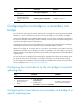
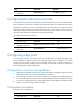
To configure the network diameter of a switched network:
Step Command Remarks
1. Enter system view.
system-view N/A
2. Configure the network
diameter of the switched
network.
stp bridge-diameter diameter The default setting is 7.
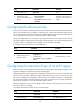
Configuring spanning tree timers
The following timers are used for spanning tree calculation:
• Forward delay—Delay time for port state transition. To prevent temporary loops on a network, the
spanning tree feature sets an intermediate port state (the learning state) before it transits from the
discarding state to the forwarding state. The feature also requires that the port transit its state after
a forward delay timer to make sure the state transition of the local port stays synchronized with the
peer.
• Hello time—Interval at which the device sends configuration BPDUs to detect link failures. If the
device receives no configuration BPDUs within the hello time interval, it recalculates the spanning
tree.
• Max age—In the CIST of an MSTP network, the device uses the max age timer to determine if a
configuration BPDU received by a port has expired. If it has, a new spanning tree calculation
process starts. The max age timer does not take effect on other MSTIs except the CIST (or MSTI 0).
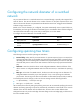
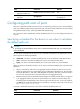
To avoid frequent network changes, make sure the timer settings meet the following formulas:
• 2 × (forward delay – 1 second) ≥ max age
• Max age ≥ 2 × (hello time + 1 second)
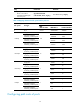
HP recommends not manually setting the spanning tree timers. HP recommends specifying the network
diameter and letting spanning tree protocols automatically calculate the timers based on the network
diameter. If the network diameter uses the default value, the timers also use their default values.
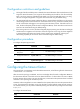
Configure the timers only on the root bridge. The timer settings on the root bridge apply to all devices on
the entire switched network.