
R21xx-HP FlexFabric 11900 Layer 2 LAN Switching Configuration Guide

81
NOTE:
W
hen the priority of a port changes, the system re-calculates the port role and initiates a state transition.
Configuring the port link type
A point-to-point link directly connects two devices. If two root ports or designated ports are connected
over a point-to-point link, they can rapidly transit to the forwarding state after a proposal-agreement
handshake process.
Configuration restrictions and guidelines
• You can configure the link type as point-to-point for a Layer 2 aggregate interface or a port that
operates in full duplex mode. HP recommends using the default setting and letting the device
automatically detect the port link type.
• The stp point-to-point force-false or stp point-to-point force-true command configured on a port in
MSTP mode takes effect on all MSTIs.
• If you configure a non-point-to-point link as a point-to-point link, the configuration might cause a
temporary loop.
Configuration procedure
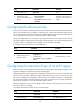
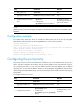
To configure the link type of a port:
Step Command Remarks
1. Enter system view.
system-view N/A
2. Enter Layer 2 Ethernet or
aggregate interface view.
interface interface-type
interface-number
N/A
3. Configure the port link type.
stp point-to-point { auto | force-false
| force-true }
By default, the link type is auto
where the port automatically
detects the link type.
Configuring the mode a port uses to recognize and
send MSTP packets
A port can receive and send MSTP packets in the following formats:
• dot1s—802.1s-compliant standard format
• legacy—Compatible format
When the number of existing MSTIs exceeds 48, the port can send only 802.1s MSTP packets.
By default, the packet format recognition mode of a port is auto. The port automatically distinguishes the
two MSTP packet formats, and determines the format of packets that it will send based on the recognized
format.