
R21xx-HP FlexFabric 11900 Layer 2 LAN Switching Configuration Guide

83
Step Command Remarks
3. Enter Layer 2 Ethernet or
aggregate interface view.
interface interface-type
interface-number
N/A
4. (Optional.) Enable the
spanning tree feature for the
port.
stp enable
By default, the spanning tree
feature is enabled on all ports.
Performing mCheck
The mCheck feature enables user intervention in the port status transition process.
If a port on a device that is running MSTP or RSTP connects to an STP device, this port automatically
transits to STP mode when the port receives STP BPDUs. However, if the peer STP device is shut down or
removed and the local device cannot detect the change, the local device cannot automatically transit
back to the original mode. To forcibly transit the port to operate in the original mode, you can perform
an mCheck operation.
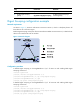
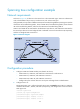
Suppose a scenario where Device A, Device B, and Device C are connected in sequence. Device A runs
STP, Device B does not run any spanning tree protocol, and Device C runs RSTP or MSTP. In this case,
when Device C receives an STP BPDU transparently transmitted by Device B, the receiving port transits to
the STP mode. If you configure Device B to run RSTP or MSTP with Device C, you must perform mCheck
operations on the ports interconnecting Device B and Device C.
The following methods for performing mCheck produce the same result.
Performing mCheck globally
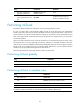
Step Command
1. Enter system view.
system-view
2. Perform mCheck.
stp global mcheck
Performing mCheck in interface view
Step Command
1. Enter system view.
system-view
2. Enter Layer 2 Ethernet or aggregate interface
view.
interface interface-type interface-number
3. Perform mCheck.
stp mcheck
NOTE:
A
n mCheck operation takes effect on a device that operates in MSTP or RSTP mode.