
R21xx-HP FlexFabric 11900 Layer 2 LAN Switching Configuration Guide

87
You can enable the No Agreement Check feature on the downstream device's port to enable the
designated port of the upstream device to transit its state rapidly.
Configuration prerequisites
Before you configure the No Agreement Check function, complete the following tasks:
• Connect a device to a third-party upstream device that supports spanning tree protocols through a
point-to-point link.
• Configure the same region name, revision level and VLAN-to-instance mappings on the two devices,
assigning them to the same region.
Configuration procedure
Enable the No Agreement Check feature on the root port.
To configure No Agreement Check:
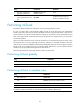
Step Command Remarks
1. Enter system view.
system-view N/A
2. Enter Layer 2 Ethernet or
aggregate interface view.
interface interface-type interface-number N/A
3. Enable No Agreement
Check.
stp no-agreement-check
By default, No Agreement
Check is disabled.
No Agreement Check configuration example
Network requirements
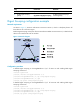
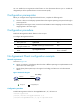
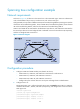
As shown in Figure 20:
• Device A connects to a third-party device that has a different spanning tree implementation. Both
devices are in the same region.
• The third-party device (Device B) is the regional root bridge, and Device A is the downstream
device.
Figure 20 Network diagram
Configuration procedure
# Enable No Agreement Check on Ten-GigabitEthernet 1/0/1 of Device A.
<DeviceA> system-view
[DeviceA] interface ten-gigabitethernet 1/0/1
[DeviceA-Ten-GigabitEthernet1/0/1] stp no-agreement-check
XGE1/0/1
Device A Device B
XGE1/0/1
Root port Designated port
Root bridge