
R21xx-HP FlexFabric 11900 Layer 3 IP Routing Command Reference
287
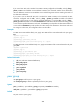
Usage guidelines
This command enables you to temporarily tear down the BGP session to a specific peer or peer group so
that you can perform network upgrade and maintenance without needing to delete and reconfigure the
peer or peer group. To recover the session, execute the undo peer ignore command.
If a session has been established to a peer, executing the peer ignore command for the peer tears down
the session and clears all related routing information.
If sessions have been established to a peer group, executing the peer ignore command for the peer
group disables the sessions to all peers in the group and clears all related routing information.
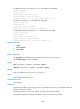
Examples
# In BGP view, disable session establishment with peer 1.1.1.1.
<Sysname> system-view
[Sysname] bgp 100
[Sysname-bgp] peer 1.1.1.1 ignore
# In BGP-VPN instance view, disable session establishment with peer 1::1.
<Sysname> system-view
[Sysname] bgp 100
[Sysname-bgp] ip vpn-instance vpn1
[Sysname-bgp-vpn1] peer 1::1 ignore
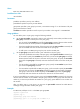
peer keep-all-routes
Use peer keep-all-routes to save all route updates from a peer or peer group, regardless of whether the
routes have passed the configured routing policy.
Use undo peer keep-all-routes to restore the default.
Syntax
In BGP IPv4 unicast address family view/BGP-VPN IPv4 unicast address family view/BGP VPNv4
address family view:
peer { group-name | ip-address } keep-all-routes
undo peer { group-name | ip-address } keep-all-routes
In BGP IPv6 unicast address family view:
peer { group-name | ipv6-address } keep-all-routes
undo peer { group-name | ipv6-address } keep-all-routes
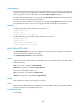
Default
Route updates from a peer or peer group are not saved.
Views
BGP IPv4 unicast address family view, BGP-VPN IPv4 unicast address family view, BGP VPNv4 address
family view, BGP IPv6 unicast address family view
Predefined user roles
network-admin