
R21xx-HP FlexFabric 11900 Layer 3 IP Routing Configuration Guide



123
Configuring IS-IS route control
Configuration prerequisites
Before the configuration, complete the following tasks:
• Configure IP addresses for interfaces to ensure IP connectivity between neighboring nodes.
• Enable IS-IS.
Configuring IS-IS link cost
The IS-IS cost of an interface is determined in the following order:
1. IS-IS cost specified in interface view.
2. IS-IS cost specified in system view. The cost is applied to the interfaces associated with the IS-IS
process.
3. Automatically calculated cost. If the cost style is wide or wide-compatible, IS-IS automatically
calculates the cost using the formula: interface cost = (bandwidth reference value/interface
bandwidth) ×10, in the range of 1 to 16777214. For other cost styles, Table 6 a
pplies.
Table 6 Automatic cost calculation scheme for cost styles other than wide and wide-compatible
Interface bandwidth Interface cost
≤ 10 Mbps 60
≤ 100 Mbps
50
≤ 155 Mbps 40
≤ 622 Mbps 30
≤ 2500 Mbps
20
> 2500 Mbps
10
4. If none of the above costs is used, a default cost of 10 applies.
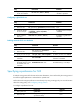
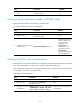
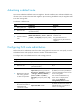
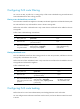
Configuring an IS-IS cost for an interface
Ste
p
Command
Remarks
1. Enter system view.
system-view N/A
2. Enter IS-IS view.
isis [ process-id ] [ vpn-instance
vpn-instance-name ]
N/A
3. (Optional.) Specify an
IS-IS cost style.
cost-style { narrow | wide | wide-compatible
| { compatible | narrow-compatible }
[ relax-spf-limit ] }
By default, the IS-IS cost type
is narrow.
4. Return to system view.
quit N/A
5. Enter interface view.
interface interface-type interface-number
N/A