
R21xx-HP FlexFabric 11900 Layer 3 IP Routing Configuration Guide



125
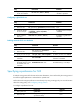
Ste
p
Command
Remarks
3. Configure a preference for
IS-IS.
preference { preference | route-policy
route-policy-name } *
The default setting is
15.
Configuring the maximum number of ECMP routes
Perform this task to implement load sharing over ECMP routes.
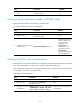
To configure the maximum number of ECMP routes:
Ste
p
Command
Remarks
1. Enter system view.
system-view N/A
2. Enter IS-IS view.
isis [ process-id ] [ vpn-instance
vpn-instance-name ]
N/A
3. Specify the maximum number
of ECMP routes.
maximum load-balancing number
By default, the maximum
number of ECMP routes
is the same as that
configured in the
max-ecmp-num
command. For more
information about the
max-ecmp-num
command, see IP Routing
Command Reference.
Configuring IS-IS route summarization
Perform this task to summarize specific routes, including IS-IS routes and redistributed routes, into a single
route. Route summarization can reduce the routing table size and the LSDB scale.
Route summarization applies only to locally generated LSPs. The cost of the summary route is the lowest
one among the costs of the more-specific routes.
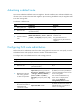
To configure route summarization:
Ste
p
Command
Remarks
1. Enter system view. system-view N/A
2. Enter IS-IS view.
isis [ process-id ] [ vpn-instance
vpn-instance-name ]
N/A
3. Configure IS-IS route
summarization.
summary ip-address { mask | mask-length }
[ avoid-feedback | generate_null0_route |
[ level-1 | level-1-2 | level-2 ] | tag tag ] *
By default, route summarization is
not configured.