
R21xx-HP FlexFabric 11900 Layer 3 IP Routing Configuration Guide


128
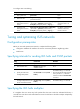
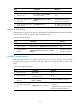
To configure IS-IS route leaking:
Ste
p
Command
Remarks
1. Enter system view.
system-view N/A
2. Enter IS-IS view.
isis [ process-id ] [ vpn-instance
vpn-instance-name ]
N/A
3. Configure route
leaking from Level-1 to
Level-2.
import-route isis level-1 into level-2 [ filter-policy
{ acl-number | prefix-list prefix-list-name |
route-policy route-policy-name } | tag tag ] *
By default, IS-IS advertises
routes from Level-1 to
Level-2.
4. Configure route
leaking from Level-2 to
Level-1.
import-route isis level-2 into level-1 [ filter-policy
{ acl-number | prefix-list prefix-list-name |
route-policy route-policy-name } | tag tag ] *
By default, IS-IS does not
advertise routes from
Level-2 to Level-1.
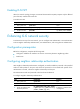
Tuning and optimizing IS-IS networks
Configuration prerequisites
Before you tune and optimize IS-IS networks, complete the following tasks:
• Configure IP addresses for interfaces to ensure IP connectivity between neighboring nodes.
• Enable IS-IS.
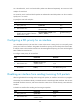
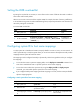
Specifying intervals for sending IS-IS hello and CSNP packets
Ste
p
Command
Remarks
1. Enter system view.
system-view N/A
2. Enter interface view.
interface interface-type
interface-number
N/A
3. Specify the interval for
sending hello packets.
isis timer hello seconds [ level-1 |
level-2 ]
The default setting is 10 seconds.
The interval between hello packets
sent by the DIS is 1/3 the hello
interval set with the isis timer hello
command.
4. Specify the interval for
sending CSNP packets on the
DIS of a broadcast network.
isis timer csnp seconds [ level-1 |
level-2 ]
The default setting is 10 seconds.
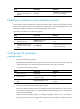
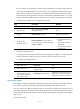
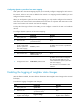
Specifying the IS-IS hello multiplier
If a neighbor does not receive any hello packets from the router within the advertised hold time, it
considers the router down and recalculates the routes. The hold time is the hello multiplier multiplied by
the hello interval.