
R21xx-HP FlexFabric 11900 Layer 3 IP Routing Configuration Guide


129
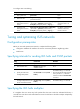
On a broadcast link, Level-1 and Level-2 hello packets are advertised separately. You must set a hello
multiplier for each level.
On a P2P link, Level-1 and Level-2 hello packets are advertised in P2P hello packets. You do not need to
specify Level-1 or Level-2.
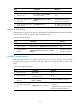
To specify the IS-IS hello multiplier:
Ste
p
Command
Remarks
1. Enter system view.
system-view N/A
2. Enter interface view.
interface interface-type
interface-number
N/A
3. Specify the number of hello packets a
neighbor must miss before it declares
that the router is down.
isis timer holding-multiplier value
[ level-1 | level-2 ]
The default setting is
3.
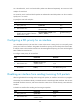
Configuring a DIS priority for an interface
On a broadcast network, IS-IS must elect a router as the DIS at a routing level. You can specify a DIS
priority at a level for an interface. The greater the interface's priority, the more likely it becomes the DIS.
If multiple routers in the broadcast network have the same highest DIS priority, the router with the highest
MAC address becomes the DIS.
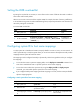
To configure a DIS priority for an interface:
Ste
p
Command
Remarks
1. Enter system view.
system-view N/A
2. Enter interface view.
interface interface-type
interface-number
N/A
3. Configure a DIS priority for
the interface.
isis dis-priority value [ level-1 |
level-2 ]
The default setting is 64.
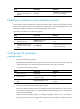
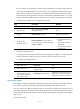
Disabling an interface from sending/receiving IS-IS packets
After being disabled from sending and receiving hello packets, an interface cannot form any neighbor
relationship, but can advertise directly connected networks in LSPs through other interfaces. This can save
bandwidth and CPU resources, and ensures that other routers know networks directly connected to the
interface.
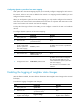
To disable an interface from sending and receiving IS-IS packets:
Ste
p
Command
Remarks
1. Enter system view. system-view N/A
2. Enter interface view.
interface interface-type
interface-number
N/A