
R21xx-HP FlexFabric 11900 Layer 3 IP Routing Configuration Guide


133
Controlling SPF calculation interval
Based on the LSDB, an IS-IS router uses the SPF algorithm to calculate the shortest path tree with itself
being the root, and uses the shortest path tree to determine the next hop to a destination network. By
adjusting the SPF calculation interval, you can prevent bandwidth and router resources from being
overconsumed due to frequent topology changes.
When network changes are not frequent, the minimum-interval is adopted. If network changes become
frequent, the SPF calculation interval is incremented by incremental-interval × 2
n-2
(n is the number of
calculation times) each time a calculation occurs until the maximum-interval is reached.
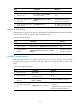
To control SPF calculation interval:
Ste
p
Command
Remarks
1. Enter system view. system-view N/A
2. Enter IS-IS view.
isis [ process-id ] [ vpn-instance
vpn-instance-name ]
N/A
3. Configure the SPF
calculation interval.
timer spf maximum-interval
[ minimum-interval [ incremental-interval ] ]
By default:
• The maximum interval is 5
seconds.
• The minimum interval is 50
milliseconds.
• The incremental interval is
200 milliseconds.
Configuring convergence priorities for specific routes
A topology change causes IS-IS routing convergence. To improve convergence speed, you can assign
different convergence priorities to specific IS-IS routes, including critical, high, medium, and low. The
higher the convergence priority, the faster the convergence speed.
IS-IS host routes have the medium convergence priority.
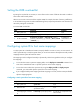
To assign convergence priorities to specific IS-IS routes:
Ste
p
Command
Remarks
1. Enter system view. system-view N/A
2. Enter IS-IS view.
isis [ process-id ] [ vpn-instance
vpn-instance-name ]
N/A
3. Assign convergence priorities
to specific IS-IS routes.
priority { critical | high | medium }
{ prefix-list prefix-list-name | tag
tag-value }
By default, IS-IS routes have the
lowest convergence priority.