
R21xx-HP FlexFabric 11900 Layer 3 IP Routing Configuration Guide


136
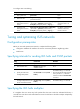
Enabling IS-IS ISPF
When the network topology changes, Incremental Shortest Path First (ISPF) computes only the affected
part of the SPT, instead of the entire SPT.
To enable IS-IS ISPF:
Ste
p
Command
Remarks
1. Enter system view.
system-view N/A
2. Enter IS-IS view. isis [ process-id ] [ vpn-instance vpn-instance-name ] N/A
3. Enable IS-IS ISPF.
ispf enable By default, IS-IS is disabled.
Enhancing IS-IS network security
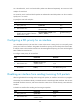
To enhance the security of an IS-IS network, you can configure IS-IS authentication. IS-IS authentication
involves neighbor relationship authentication, area authentication, and routing domain authentication.
Configuration prerequisites
Before the configuration, complete the following tasks:
• Configure IP addresses for interfaces to ensure IP connectivity between neighboring nodes.
• Enable IS-IS.
Configuring neighbor relationship authentication
With neighbor relationship authentication configured, an interface adds the password in the specified
mode into hello packets to the peer and checks the password in the received hello packets. If the
authentication succeeds, it forms the neighbor relationship with the peer.
The authentication mode and password at both ends must be identical.
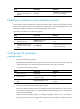
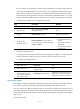
To configure neighbor relationship authentication:
Ste
p
Command
Remarks
1. Enter system view. system-view N/A
2. Enter interface view.
interface interface-type interface-number
N/A
3. Specify the authentication
mode and password.
isis authentication-mode { md5 | simple }
{ cipher cipher-string | plain plain-string }
[ level-1 | level-2 ] [ ip | osi ]
By default, no authentication
is configured.