
R21xx-HP FlexFabric 11900 Layer 3 IP Routing Configuration Guide


137
Configuring area authentication
Area authentication prevents the router from installing routing information from untrusted routers into the
Level-1 LSDB. The router encapsulates the authentication password in the specified mode in Level-1
packets (LSP, CSNP, and PSNP) and checks the password in received Level-1 packets.
Routers in a common area must have the same authentication mode and password.
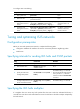
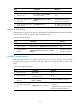
To configure area authentication:
Ste
p
Command
Remarks
1. Enter system view.
system-view N/A
2. Enter IS-IS view.
isis [ process-id ] [ vpn-instance
vpn-instance-name ]
N/A
3. Specify the area
authentication mode and
password.
area-authentication-mode { md5 |
simple } { cipher cipher-string | plain
plain-string } [ ip | osi ]
By default, no area authentication
is configured.
Configuring routing domain authentication
Routing domain authentication prevents untrusted routing information from entering into a routing
domain. A router with the authentication configured encapsulates the password in the specified mode
into Level-2 packets (LSP, CSNP, and PSNP) and check the password in received Level-2 packets.
All the routers in the backbone must have the same authentication mode and password.
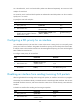
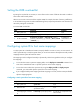
To configure routing domain authentication:
Ste
p
Command
Remarks
1. Enter system view.
system-view N/A
2. Enter IS-IS view.
isis [ process-id ] [ vpn-instance
vpn-instance-name ]
N/A
3. Specify the routing domain
authentication mode and
password.
domain-authentication-mode
{ md5 | simple } { cipher
cipher-string | plain plain-string }
[ ip | osi ]
By default, no routing domain
authentication is configured.
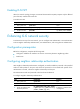
Configuring IS-IS GR
GR ensures forwarding continuity when a routing protocol restarts or an active/standby switchover
occurs.
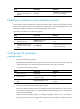
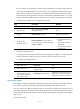
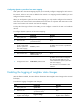
Two routers are required to complete a GR process. The following are router roles in a GR process.
• GR Restarter—Graceful restarting router. It must have GR capability.