
R21xx-HP FlexFabric 11900 Layer 3 IP Routing Configuration Guide




160
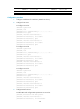
Summary Count : 1
Destination: 120.1.1.0/24
Protocol: ISIS Process ID: 1
SubProtID: 0x1 Age: 04h20m37s
Cost: 20 Preference: 10
Tag: 0 State: Active Adv
OrigTblID: 0x0 OrigVrf: default-vrf
TableID: 0x2 OrigAs: 0
NBRID: 0x26000002 LastAs: 0
AttrID: 0xffffffff Neighbor: 0.0.0.0
Flags: 0x1008c OrigNextHop: 10.1.1.100
Label: NULL RealNextHop: 10.1.1.100
BkLabel: NULL BkNextHop: N/A
Tunnel ID: Invalid Interface: Vlan-interface11
BkTunnel ID: Invalid BkInterface: N/A
The output shows that Switch A and Switch B communicate through VLAN-interface 11.
IS-IS FRR configuration example
Network requirements
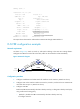
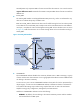
As shown in Figure 43, Switch S, Switch A, and Switch D belong to the same IS-IS routing domain.
Configure IS-IS FRR so that when the Link A fails, traffic can be switched to Link B immediately.
Figure 43 Network diagram
Configuration procedure
1. Configure IP addresses and subnet masks for interfaces on the switches. (Details not shown.)
2. Configure IS-IS on the switches to make sure Switch A, Switch D, and Switch S can communicate
with each other at Layer 3. (Details not shown.)
3. Configure IS-IS FRR:
Enable IS-IS FRR to automatically calculate a backup next hop, or designate a backup next hop by
using a referenced routing policy.
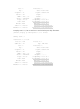
{ (Method 1.) Enable IS-IS FRR to automatically calculate a backup next hop:
# Configure Switch S.
Switch S Switch D
Switch A
Loop 0
1.1.1.1/32
V
l
a
n
-i
n
t
1
0
0
1
2
.
1
2
.
1
2
.
1
/
2
4
Vlan-int200
13.13.13.1/24
Vlan-int200
13.13.13.2/24
V
l
a
n
-
i
n
t
1
0
0
1
2
.
1
2
.
1
2
.
2
/
2
4
V
l
a
n
-
i
n
t
1
0
1
2
4
.
2
4
.
2
4
.
2
/
2
4
V
l
a
n
-i
n
t
1
0
1
2
4
.
2
4
.
2
4
.
4
/
2
4
Loop 0
4.4.4.4/32
Link A
Link B