
R21xx-HP FlexFabric 11900 Layer 3 IP Routing Configuration Guide

191
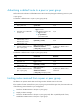
Ste
p
Command
Remarks
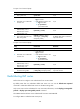
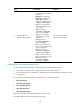
3. Enter BGP IPv4 unicast
address family view or
BGP-VPN IPv4 unicast
address family view.
ipv4-family [ unicast ] N/A
4. Create a summary route in the
BGP routing table.
aggregate ip-address { mask |
mask-length } [ as-set |
attribute-policy route-policy-name
| detail-suppressed | origin-policy
route-policy-name |
suppress-policy
route-policy-name ] *
By default, no summary route is
configured.
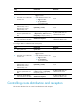
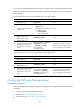
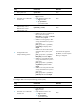
To configure BGP manual route summarization (IPv6):
Ste
p
Command
Remarks
1. Enter system view.
system-view N/A
2. Enter BGP view. bgp as-number
N/A
3. Enter BGP IPv6 unicast
address family view.
ipv4-family [ unicast ] N/A
4. Create a summary route in the
IPv6 BGP routing table.
aggregate ipv6-address
prefix-length [ as-set |
attribute-policy route-policy-name
| detail-suppressed | origin-policy
route-policy-name |
suppress-policy
route-policy-name ] *
By default, no summary route is
configured.
Advertising optimal routes in the IP routing table
By default, BGP advertises optimal routes in the BGP routing table, which may not be optimal in the IP
routing table. This task allows you to advertise BGP routes that are optimal in the IP routing table to all
BGP peers.
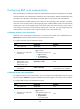
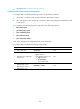
To enable BGP to advertise optimal routes in the IP routing table:
Ste
p
Command
Remarks
1. Enter system view.
system-view N/A
2. Enter BGP view.
bgp as-number N/A
3. Enable BGP to advertise
optimal routes in the IP routing
table.
advertise-rib-active
By default, BGP advertises optimal
routes in the BGP routing table.