
R21xx-HP FlexFabric 11900 Layer 3 IP Routing Configuration Guide

192
Advertising a default route to a peer or peer group
Perform this task to advertise a default BGP route with the next hop being the advertising router to a peer
or peer group.
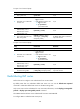
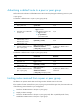
To advertise a default route to a peer or peer group (IPv4):
Ste
p
Command
Remarks
1. Enter system view.
system-view N/A
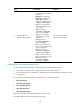
2. Enter BGP view or BGP-VPN
instance view.
• Enter BGP view:
bgp as-number
• Enter BGP-VPN instance view:
a. bgp as-number
b. ip vpn-instance
vpn-instance-name
N/A
3. Enter BGP IPv4 unicast
address family view or
BGP-VPN IPv4 unicast
address family view.
ipv4-family [ unicast ] N/A
4. Advertise a default route to a
peer or peer group.
peer { group-name | ip-address }
default-route-advertise
[ route-policy route-policy-name ]
By default, no default route is
advertised.
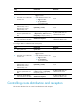
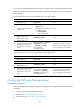
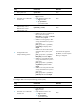
To advertise a default route to a peer or peer group (IPv6):
Ste
p
Command
Remarks
1. Enter system view.
system-view N/A
2. Enter BGP view. bgp as-number
N/A
3. Enter BGP IPv6 unicast
address family view.
ipv6-family [ unicast ] N/A
4. Advertise a default route to a
peer or peer group.
peer { group-name |
ipv6-address }
default-route-advertise
[ route-policy route-policy-name ]
By default, no default route is
advertised.
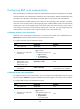
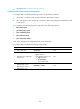
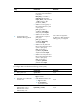
Limiting routes received from a peer or peer group
This feature can prevent attacks that send a large number of BGP routes to the router.
If the number of routes received from a peer or peer group exceeds the upper limit, the router takes one
of the following actions based on your configuration:
• Tear down the BGP session to the peer or peer group.
• Display an alarm message.
• Tear down the BGP session to the peer or peer group and, after a specified period of time,
reestablishes a BGP session to the peer or peer group.