
R21xx-HP FlexFabric 11900 Layer 3 IP Routing Configuration Guide

194
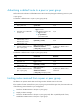
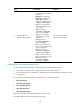
• AS path list (see "Configuring routing policies")
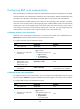
Configuring BGP route distribution filtering policies
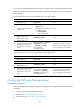
To configure BGP route distribution filtering policies, use the following methods:
• Use an ACL or prefix list to filter routing information advertised to all peers.
• Use a routing policy, ACL, AS path list, or prefix list to filter routing information advertised to a peer
or peer group.
If you configure multiple filtering policies, apply them in the following sequence:
1. filter-policy export
2. peer filter-policy export
3. peer as-path-acl export
4. peer prefix-list export
5. peer route-policy export
Only routes passing all the configured policies can be advertised.
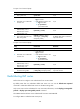
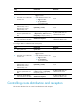
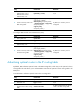
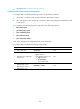
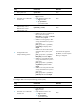
To configure BGP route distribution filtering policies (IPv4):
Ste
p
Command
Remarks
1. Enter system view.
system-view N/A
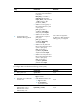
2. Enter BGP view or BGP-VPN
instance view.
• Enter BGP view:
bgp as-number
• Enter BGP-VPN instance view:
a. bgp as-number
b. ip vpn-instance
vpn-instance-name
N/A
3. Enter BGP IPv4 unicast
address family view or
BGP-VPN IPv4 unicast
address family view.
ipv4-family [ unicast ] N/A