
R21xx-HP FlexFabric 11900 Layer 3 IP Routing Configuration Guide



207
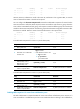
Figure 54 NEXT_HOP attribute configuration
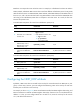
If a BGP router has two peers on a broadcast network, it does not set itself as the next hop for routes sent
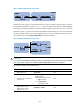
to an EBGP peer by default. As shown in Figure 55, R
outer A and Router B establish an EBGP neighbor
relationship, and Router B and Router C establish an IBGP neighbor relationship. They are on the same
b r o a d c a s t n e t w o r k 1.1.1.0 / 24 . W h e n R o u t e r B s e n d s E B G P routes to Router A, it does not set itself as the
next hop by default. However, you can configure Router B to set it (1.1.1.2/24) as the next hop for routes
sent to Router A by using the peer next-hop-local command as needed.
Figure 55 NEXT_HOP attribute configuration
IMPORTANT:
If you have configured BGP load balancing, the router sets itself as the next hop for routes sent to an IBGP
peer or peer group regardless of whether the peer next-hop-local command is configured.
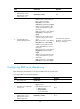
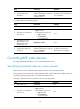
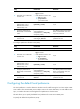
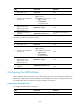
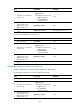
To configure the NEXT_HOP attribute (IPv4):
Ste
p
Command
Remarks
1. Enter system view.
system-view N/A
2. Enter BGP view or BGP-VPN
instance view.
• Enter BGP view:
bgp as-number
• Enter BGP-VPN instance view:
a. bgp as-number
b. ip vpn-instance
vpn-instance-name
N/A
3. Enter BGP IPv4 unicast
address family view or
BGP-VPN IPv4 unicast
address family view.
ipv4-family [ unicast ] N/A