
R21xx-HP FlexFabric 11900 Layer 3 IP Routing Configuration Guide


217
Enabling 4-byte AS number suppression
BGP supports 4-byte AS numbers. The 4-byte AS number occupies four bytes, in the range of 1 to
4294967295. By default, a device sends an Open message to the peer device for session establishment.
The Open message indicates that the device supports 4-byte AS numbers. If the peer device does not
support 4-byte AS numbers (supports only 2-byte AS numbers), the session cannot be established. To
resolve this issue, enable the 4-byte AS number suppression function. The device then sends an Open
message to inform the peer that it does not support 4-byte AS numbers, so the BGP session can be
established.
If the peer device supports 4-byte AS numbers, do not enable the 4-byte AS number suppression function.
Otherwise, the BGP session cannot be established.
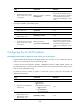
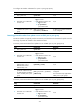
To enable 4-byte AS number suppression (IPv4):
Step Command Remarks
1. Enter system view.
system-view
N/A
2. Enter BGP view or BGP-VPN
instance view.
• Enter BGP view:
bgp as-number
• Enter BGP-VPN instance view:
a. bgp as-number
b. ip vpn-instance
vpn-instance-name
N/A
3. Enable 4-byte AS number
suppression.
peer { group-name | ip-address }
capability-advertise
suppress-4-byte-as
By default, 4-byte AS number
suppression is not enabled.
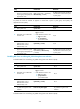
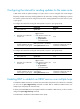
To enable 4-byte AS number suppression (IPv6):
Step Command Remarks
1. Enter system view.
system-view N/A
2. Enter BGP view or BGP-VPN
instance view.
• Enter BGP view:
bgp as-number
• Enter BGP-VPN instance view:
a. bgp as-number
b. ip vpn-instance
vpn-instance-name
N/A
3. Enable 4-byte AS number
suppression.
peer { group-name |
ipv6-address } capability-advertise
suppress-4-byte-as
By default, 4-byte AS number
suppression is not enabled.
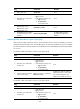
Configuring BGP load balancing
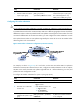
If multiple BGP routes with the same AS_PATH, ORIGIN, LOCAL_PREF, and MED attributes to a
destination exist, you can use the balance command to enable load balancing over these ECMP routes
and specify the maximum number of ECMP routes.