
R21xx-HP FlexFabric 11900 Layer 3 IP Routing Configuration Guide

218
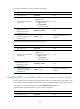
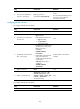
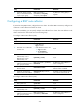
To configure the maximum number of ECMP routes (IPv4):
Ste
p
Command
Remarks
1. Enter system view. system-view N/A
2. Enter BGP view or BGP-VPN
instance view.
• Enter BGP view:
bgp as-number
• Enter BGP-VPN instance view:
a. bgp as-number
b. ip vpn-instance
vpn-instance-name
N/A
3. Enter BGP IPv4 unicast
address family view or
BGP-VPN IPv4 unicast
address family view.
ipv4-family [ unicast ] N/A
4. Configure the maximum
number of ECMP routes for
load balancing.
balance number
By default, load balancing is
disabled.
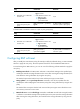
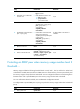
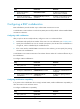
To configure the maximum number of ECMP routes (IPv6):
Ste
p
Command
Remarks
1. Enter system view. system-view N/A
2. Enter BGP view or BGP-VPN
instance view.
• Enter BGP view:
bgp as-number
• Enter BGP-VPN instance view:
a. bgp as-number
b. ip vpn-instance
vpn-instance-name
N/A
3. Enter BGP IPv6 unicast
address family view or
BGP-VPN IPv6 unicast
address family view.
ipv6-family [ unicast ] N/A
4. Configure the maximum
number of ECMP routes for
load balancing.
balance number
By default, load balancing is
disabled.
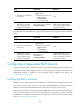
Disabling BGP to establish a session to a peer or peer group
This task enables you to temporarily tear down the BGP session to a specific peer or peer group so that
you can perform network upgrade and maintenance without needing to delete and reconfigure the peer
or peer group. To recover the session, execute the undo peer ignore command.
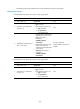
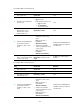
To disable BGP to establish a session to a peer or peer group (IPv4):
Ste
p
Command
Remarks
1. Enter system view.
system-view N/A