
R21xx-HP FlexFabric 11900 Layer 3 IP Routing Configuration Guide

226
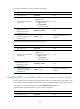
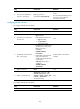
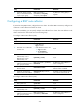
Step Command Remarks
5. (Optional.) Apply a routing
policy to routes advertised to
a peer or peer group.
peer { group-name |
ipv6-address } route-policy
route-policy-name export
By default, no routing policy is
applied.
Configuring a BGP route reflector
If an AS has many BGP routers, configure them as a cluster. To reduce IBGP connections, configure one
of them as a route reflector and others as clients.
To improve availability, you can specify multiple route reflectors for a cluster. The route reflectors in the
cluster must have the same cluster ID to avoid routing loops.
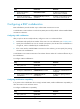
To configure a BGP route reflector (IPv4):
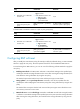
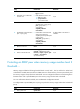
Step Command Remarks
1. Enter system view. system-view N/A
2. Enter BGP view or BGP-VPN
instance view.
• Enter BGP view:
bgp as-number
• Enter BGP-VPN instance view:
a. bgp as-number
b. ip vpn-instance
vpn-instance-name
N/A
3. Enter BGP IPv4 unicast
address family view or
BGP-VPN IPv4 unicast
address family view.
ipv4-family [ unicast ] N/A
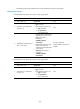
4. Configure the router as a route
reflector and specify a peer or
peer group as its client.
peer { group-name | ip-address }
reflect-client
By default, no route reflector or
client is configured.
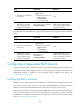
5. Enable route reflection
between clients.
reflect between-clients
By default, route reflection
between clients is enabled.
6. (Optional.) Configure the
cluster ID of the route reflector.
reflector cluster-id { cluster-id |
ip-address }
By default, a route reflector uses its
own router ID as the cluster ID.
To configure a BGP route reflector (IPv6):
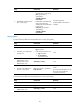
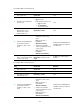
Step Command Remarks
1. Enter system view.
system-view N/A
2. Enter BGP view. bgp as-number N/A
3. Enter BGP IPv6 unicast
address family view.
ipv6-family [ unicast ] N/A
4. Configure the router as a route
reflector and specify a peer or
peer group as its client.
peer { group-name |
ipv6-address } reflect-client
By default, no route reflector or
client is configured.