
R21xx-HP FlexFabric 11900 Layer 3 IP Routing Configuration Guide

227
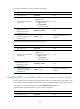
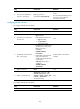
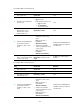
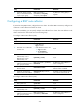
Step Command Remarks
5. Enable route reflection
between clients.
reflect between-clients
By default, route reflection
between clients is enabled.
6. (Optional.) Configure the
cluster ID of the route reflector.
reflector cluster-id { cluster-id |
ip-address }
By default, a route reflector uses its
own router ID as the cluster ID.
Configuring a BGP confederation
BGP confederation provides another way to reduce IBGP connections in an AS.
A confederation contains sub-ASs. In each sub-AS, IBGP peers are fully meshed. Sub-ASs establish EBGP
connections in between.
Configuring a BGP confederation
After you split an AS into multiple sub-ASs, configure a router in a sub-AS as follows:
1. Enable BGP and specify the AS number of the router. For more information, see "Enabling BGP."
2. Specify the confederation ID. From an outsider’s perspective, the sub-ASs of the confederation is
a single AS, which is identified by the confederation ID.
3. If the router needs to establish EBGP connections to other sub-ASs, you must specify the peering
sub-ASs in the confederation.
A confederation can contain a maximum of 32 sub-ASs. The AS number of a sub-AS is effective only in
the confederation.
To configure a BGP confederation:
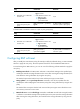
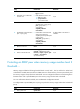
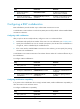
Step Command Remarks
1. Enter system view.
system-view N/A
2. Enter BGP view. bgp as-number N/A
3. Configure a confederation ID.
confederation id as-number
By default, no confederation ID is
configured.
4. Specify peering sub-ASs in the
confederation.
confederation peer-as
as-number-list
By default, no peering sub-AS is
specified.
Configuring confederation compatibility
If any routers in the confederation do not comply with RFC 3065, enable confederation compatibility to
allow the router to work with those routers.
To configure confederation compatibility:
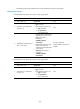
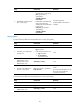
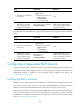
Step Command Remarks
1. Enter system view. system-view N/A
2. Enter BGP view.
bgp as-number N/A