
R21xx-HP FlexFabric 11900 Layer 3 IP Routing Configuration Guide

229
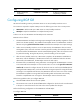
Ste
p
Command
Remarks
2. Enter BGP view. bgp as-number N/A
3. Enable GR capability for BGP.
graceful-restart
By default, GR capability is
disabled for BGP.
4. Configure the GR timer.
graceful-restart timer restart
timer
The default setting is 150 seconds.
The time that a peer waits to
reestablish a session must be less
than the hold time.
5. Configure the maximum time to
wait for the End-of-RIB marker.
graceful-restart timer
wait-for-rib timer
The default setting is 180 seconds.
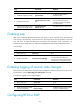
Enabling trap
After trap is enabled for BGP, BGP generates Level-4 traps to report important events. The generated
traps are sent to the information center of the device. The output rules of the traps (whether to output the
traps and where to output) are determined according to the information center configuration. For
information center configuration, see Network Management and Monitoring Configuration Guide.
To enable trap:
Ste
p
Command
Remarks
1. Enter system view. system-view N/A
2. Enable trap for BGP. snmp-agent trap enable bgp
By default, trap for BGP is enabled.
For more information about this
command, see Network Management
and Monitoring Configuration Guide.
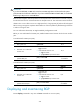
Enabling logging of session state changes
Perform this task to enable BGP to log BGP session establishment and disconnection events. To view the
log information, use the display bgp peer ipv4 log-info command.
To enable the logging of session state changes:
Step Command Remarks
1. Enter system view.
system-view N/A
2. Enter BGP view.
bgp as-number N/A
3. Enable the logging of session
state changes globally.
log-peer-change
By default, logging of session state
changes is enabled globally.
Configuring BFD for BGP