
R21xx-HP FlexFabric 11900 Layer 3 IP Routing Configuration Guide



241
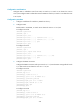
2.
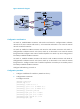
Configure static routing between Switch A and Switch B:
# Configure a default route with the next hop 192.168.212.1 on Switch A.
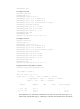
<SwitchA> system-view
[SwitchA] ip route-static 0.0.0.0 0 192.168.212.1
# Configure static routes to 192.168.64.0/24, 192.168.74.0/24, and 192.168.99.0/24 with
the same next hop 192.168.212.161 on Switch B.
<SwitchB> system-view
[SwitchB] ip route-static 192.168.64.0 24 192.168.212.161
[SwitchB] ip route-static 192.168.74.0 24 192.168.212.161
[SwitchB] ip route-static 192.168.99.0 24 192.168.212.161
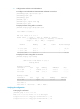
3. Configure OSPF between Switch B and Switch C and configure OSPF on Switch B to redistribute
static routes:
# Configure OSPF to advertise the local network and enable OSPF to redistribute static routes on
Switch B.
[SwitchB] ospf
[SwitchB-ospf-1] area 0
[SwitchB-ospf-1-area-0.0.0.0] network 172.17.100.0 0.0.0.255
[SwitchB-ospf-1-area-0.0.0.0] quit
[SwitchB-ospf-1] import-route static
[SwitchB-ospf-1] quit
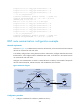
# Configure OSPF to advertise the local networks on Switch C.
[SwitchC] ospf
[SwitchC-ospf-1] area 0
[SwitchC-ospf-1-area-0.0.0.0] network 172.17.100.0 0.0.0.255
[SwitchC-ospf-1-area-0.0.0.0] network 10.220.2.0 0.0.0.255
[SwitchC-ospf-1-area-0.0.0.0] quit
[SwitchC-ospf-1] quit
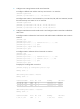
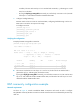
# Display the IP routing table on Switch C.
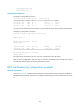
[SwitchC] display ip routing-table protocol ospf
Summary Count : 5
OSPF Routing table Status : <Active>
Summary Count : 3
Destination/Mask Proto Pre Cost NextHop Interface
192.168.64.0/24 OSPF 150 1 172.17.100.1 Vlan100
192.168.74.0/24 OSPF 150 1 172.17.100.1 Vlan100
192.168.99.0/24 OSPF 150 1 172.17.100.1 Vlan100
OSPF Routing table Status : <Inactive>
Summary Count : 2
Destination/Mask Proto Pre Cost NextHop Interface
10.220.2.0/24 OSPF 10 1 10.220.2.16 Vlan200