
R21xx-HP FlexFabric 11900 Layer 3 IP Routing Configuration Guide

280
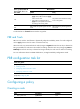
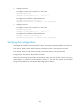
To configure interface PBR:
Ste
p
Command Remarks
1. Enter system
view.
system-view N/A
2. Enter interface
view.
interface interface-type interface-number N/A
3. Apply a policy
to the interface.
ip policy-based-route policy-name
By default, no policy is applied to the
interface.
Displaying and maintaining PBR
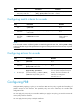
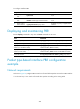
Execute display commands in any view and reset commands in user view.
Task Command
Display PBR policy information. display ip policy-based-route [ policy policy-name ]
Display PBR configuration. display ip policy-based-route setup
Display interface PBR configuration and
statistics (in standalone mode).
display ip policy-based-route interface interface-type
interface-number [ slot slot-number ]
Display interface PBR configuration and
statistics (in IRF mode).
display ip policy-based-route interface interface-type
interface-number [ chassis chassis-number slot slot-number ]
Clear PBR statistics. reset ip policy-based-route statistics [ policy policy-name ]
Packet type-based interface PBR configuration
example
Network requirements
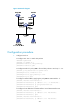
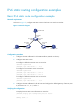
As shown in Figure 70, configure PBR on Switch A to forward all TCP packets received on VLAN-interface
11 to the next hop 1.1.2.2. Switch A forwards other packets according to the routing table.