
R21xx-HP FlexFabric 11900 Layer 3 IP Routing Configuration Guide

284
IMPORTANT:
Enabling BFD for a flapping route could worsen the situation.
BFD provides a general purpose, standard, and medium- and protocol-independent fast failure detection
mechanism. It can uniformly and quickly detect the failures of the bidirectional forwarding paths between
two routers for protocols, such as routing protocols and MPLS. For more information about BFD, see High
Availability Configuration Guide.
Bidirectional control mode
To use BFD bidirectional control detection between two devices, enable BFD control mode for each
device's static route destined to the peer.
To configure a static route and enable BFD control mode for it, specify an output interface and a direct
next hop, or specify an indirect next hop and a specific BFD packet source address for the static route.
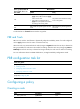
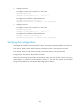
To configure BFD control mode for an IPv6 static route (direct next hop):
Ste
p
Command
Remarks
1. Enter system view.
system-view N/A
2. Configure BFD
control mode for an
IPv6 static route.
• Method 1:
ipv6 route-static ipv6-address prefix-length
interface-type interface-number next-hop-address bfd
control-packet [ preference preference-value ] [ tag
tag-value ] [ description description-text ]
• Method 2:
ipv6 route-static vpn-instance s-vpn-instance-name
ipv6-address prefix-length interface-type
interface-number next-hop-address bfd control-packet
[ preference preference-value ] [ tag tag-value ]
[ description description-text ]
Use either method.
By default, BFD
control mode for an
IPv6 static route is
not configured.
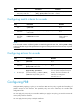
To configure BFD control mode for an IPv6 static route (indirect next hop):
Ste
p
Command
Remarks
1. Enter system view.
system-view N/A
2. Configure BFD
control mode for an
IPv6 static route.
• Method 1:
ipv6 route-static ipv6-address prefix-length
{ next-hop-address bfd control-packet bfd-source
ipv6-address | vpn-instance d-vpn-instance-name
next-hop-address bfd control-packet bfd-source ip-address }
[ preference preference-value ] [ tag tag-value ] [ description
description-text ]
• Method 2:
ipv6 route-static vpn-instance s-vpn-instance-name
ipv6-address prefix-length { next-hop-address bfd
control-packet bfd-source ipv6-address | vpn-instance
d-vpn-instance-name next-hop-address bfd control-packet
bfd-source ipv6-address } [ preference preference-value ]
[ tag tag-value ] [ description description-text ]
Use either
method.
By default, BFD
control mode
for an IPv6
static route is
not configured.