
R21xx-HP FlexFabric 11900 Layer 3 IP Routing Configuration Guide

286
IPv6 static routing configuration examples
Basic IPv6 static route configuration example
Network requirements
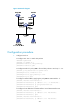
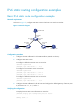
As shown in Figure 71, configure IPv6 static routes so that hosts can reach one another.
Figure 71 Network diagram
Configuration procedure
1. Configure the IPv6 addresses for all VLAN interfaces. (Details not shown.)
2. Configure IPv6 static routes:
# Configure a default IPv6 static route on Switch A.
<SwitchA> system-view
[SwitchA] ipv6 route-static :: 0 4::2
# Configure two IPv6 static routes on Switch B.
<SwitchB> system-view
[SwitchB] ipv6 route-static 1:: 64 4::1
[SwitchB] ipv6 route-static 3:: 64 5::1
# Configure a default IPv6 static route on Switch C.
<SwitchC> system-view
[SwitchC] ipv6 route-static :: 0 5::2
3. Configure the IPv6 addresses for all the hosts and configure the default gateway of Host A, Host
B, and Host C as 1::1, 2::1, and 3::1.
Verifying the configuration
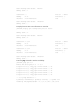
# Display the IPv6 static route information on Switch A.
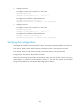
[SwitchA] display ipv6 routing-table protocol static
Summary Count : 1
Vlan-int400
2::1/64
Host B 2::2/64
Vlan-int200
4::2/64
Vlan-int300
5::2/64
Vlan-int200
4::1/64
Vlan-int300
5::1/64
Vlan-int500
3::1/64
Vlan-int100
1::1/64
Host A 1::2/64
Host C 3::2/64
Switch B
Switch A
Switch C