
R21xx-HP FlexFabric 11900 Layer 3 IP Routing Configuration Guide




288
BFD for IPv6 static routes configuration example (direct next
hop)
Network requirements
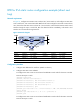
In Figure 72, configure an IPv6 static route to subnet 120::/64 on Switch A, and configure an IPv6 static
route to subnet 121::/64 on Switch B. Enable BFD for both routes. Configure an IPv6 static route to subnet
120::/64 and an IPv6 static route to subnet 121::/64 on Switch C. When the link between Switch A and
Switch B through the Layer 2 switch fails, BFD can detect the failure immediately, and Switch A and
Switch B can communicate through Switch C.
Figure 72 Network diagram
Device Interface IPv6 address
Device
Interface
IPv6 address
Switch A Vlan-int10 12::1/64 Switch B Vlan-int10 12::2/64
Vlan-int11 10::102/64
Vlan-int13 13::1/64
Switch C Vlan-int11 10::100/64
Vlan-int13 13::2/64
Configuration procedure
1. Configure IPv6 addresses for interfaces. (Details not shown.)
2. Configure IPv6 static routes and BFD:
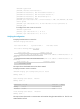
# Configure IPv6 static routes on Switch A and enable BFD control mode for the static route that
traverses the Layer 2 switch.
<SwitchA> system-view
[SwitchA] interface vlan-interface 10
[SwitchA-vlan-interface10] bfd min-transmit-interval 500
[SwitchA-vlan-interface10] bfd min-receive-interval 500
[SwitchA-vlan-interface10] bfd detect-multiplier 9
[SwitchA-vlan-interface10] quit
[SwitchA] ipv6 route-static 120:: 64 vlan-interface 10 FE80::2E0:FCFF:FE58:123E bfd
control-packet
[SwitchA] ipv6 route-static 120:: 64 10::100 preference 65
[SwitchA] quit
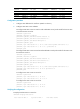
# Configure IPv6 static routes on Switch B and enable BFD control mode for the static route that
traverses the Layer 2 switch.